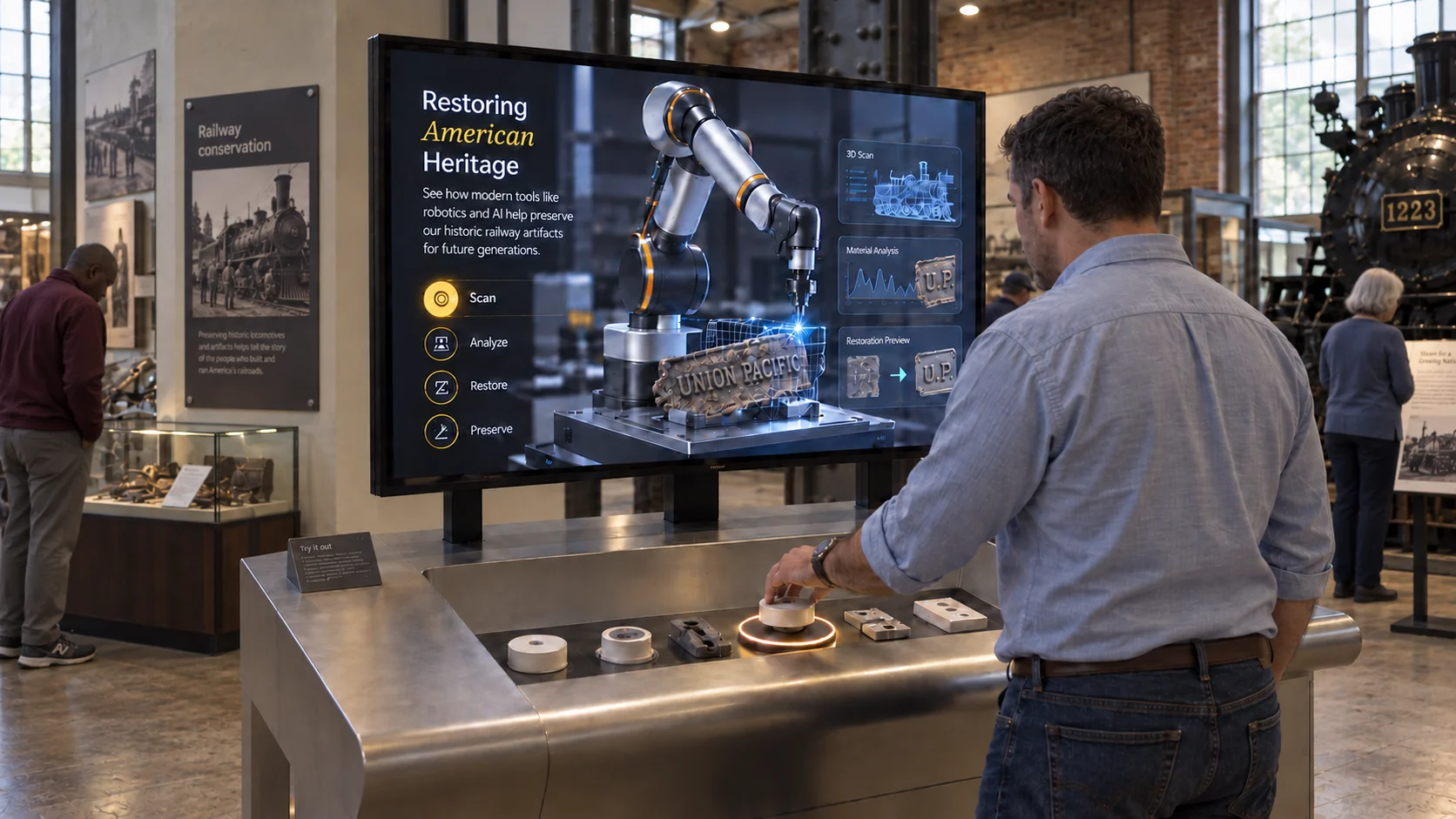
Short answer: an RFID pick-and-place exhibit needs five things: tagged objects, a short-range RFID/NFC reader hidden in a counter or plinth, a Windows PC (Core i5 class, 16 GB RAM, SSD is a sensible baseline), a display, and software that maps each tag to its content. Plan a counter 600-900 mm deep with about 1.2 m of clear approach space. Most failures come from metal interfering with the reader, poor enclosure design, and content that wasn't tested on the real hardware.
Visitors pick up a real object, such as a product, a replica artefact or an architectural fragment, and place it on a marked spot. The screen responds with that object's story. It's one of the most intuitive interactions in a museum or brand space because it needs no instructions.
Why RFID works so well in exhibits
- Physical objects hold attention. People want to touch things; RFID turns that instinct into navigation.
- No learning curve. "Put it here" is universal across ages and languages.
- Content can evolve. Swap the content mapped to a tag without changing the object: useful for product ranges that change. At the Bosch Museum experience centre, product interactions connect physical objects to content designed to evolve as the range grows.
- Durable. No touchscreen to smudge or wear out at the point of interaction.
Step 1: Choose the right RFID technology
For pick-and-place exhibits, you almost always want short-range HF RFID / NFC (13.56 MHz). It reads a tag within a few centimetres, so only the object placed on the target triggers content instead of one in a visitor's hand nearby.
UHF RFID reads over metres. That's useful for tracking visitors or items across a room, but for a single "place here" spot it causes false triggers.
Things to decide early:
- How many objects? Each needs a unique tag ID.
- One spot or several? One reader per placement spot is simplest and most reliable.
- What are the objects made of? Metal and liquids detune tags. For metal objects, use on-metal (ferrite-backed) tags, or mount the tag in a non-metal base.
Step 2: Plan the hardware
A practical baseline for a single-station exhibit:
| Component | Recommendation |
|---|---|
| Display | Commercial display or projector, sized for viewing from the counter |
| Playback PC | Windows, Core i5 class, 16 GB RAM, SSD |
| Reader | Compatible RFID/NFC reader, one per placement spot |
| Tags | Matched to the reader; on-metal tags for metal objects |
| USB | Powered USB hub if running multiple readers |
| Enclosure | Reader housing with cable management and service access |
Buy one reader and a few tags first and test them with your actual objects before ordering in bulk.
Step 3: Design the space
- Counter depth: typically 600-900 mm, enough to place objects comfortably while seeing the screen.
- Approach: allow about 1.2 m of clear space in front so visitors can stand and others can watch.
- Circulation: keep emergency routes and service clearances outside the active zone.
- Accessibility: set counter height and screen angle so wheelchair users and children can reach the placement spot and see the content.
- Visual cue: mark the placement spot clearly: an inset, a light ring or an outline of the object.
Step 4: Build the enclosure properly
This is where many projects fail:
- Keep metal away from the antenna. Metal brackets, fixings or surfaces directly under the reader reduce read range. Use wood, acrylic or MDF around the read zone.
- Secure the reader and objects without blocking antenna performance. Tethers on high-value objects are common.
- Plan service access. Someone will need to reach the reader, the USB cable and the PC without dismantling the exhibit.
- Separate cables. Run USB and signal cables away from noisy mains power where practical.
- Provide clean power with surge protection and an accessible isolation point.
Step 5: Map objects to content
Every tag ID links to a content set: images, video, text, languages. In WEEV's RFID Pick & Place Block, this is done in WEEV Studio: choose a template, map content to each object, and set colours, typography and branding.
Content tips:
- Lead with the one fact visitors will remember, then offer depth.
- Keep videos short. 30-90 seconds works in busy galleries.
- Design an idle state that invites people to pick something up.
- Decide what happens when an object is removed: return to idle, or keep the story on screen.
- Plan languages from the start.
Step 6: Test on the real setup
Before opening:
- Place every object from different angles and speeds; check for missed or double reads.
- Test with objects placed quickly one after another.
- Check readability of content from the visitor's position.
- Run the experience for a full day to catch memory leaks, sleep settings or update prompts.
- Confirm the PC starts the experience automatically after a power cut.
Step 7: Measure what happens
Analytics show which objects visitors pick up most and how long they stay. That tells you which stories work and which need rewriting. WEEV Player provides engagement analytics for deployed experiences. Wired internet is recommended so analytics, updates and remote support work reliably, though the experience itself can run locally.
What to prepare before you contact a supplier
- Room plan and site photographs
- Display size and mounting proposal
- List of objects (materials, sizes)
- Any existing computer, reader or sensor hardware
- Audience profile, accessibility needs and target opening date
Frequently asked questions
What RFID frequency is best for museum exhibits? Short-range HF RFID / NFC at 13.56 MHz suits pick-and-place interactions because it only reads tags placed directly on the reader. UHF is better for longer-range tracking.
Can RFID tags work on metal objects? Yes, with on-metal tags that include a shielding layer, or by placing the tag in a non-metal base. Standard tags fail or read poorly directly on metal.
How many objects can one RFID exhibit handle? Software can map many unique tags. The practical limit is the physical space and how many objects visitors can meaningfully explore. In practice, a handful to around a dozen objects keeps a single station easy to explore.
Do I need internet for an RFID exhibit? No. The experience can run locally. Internet helps with analytics syncing, updates and remote support.
How much does an RFID interactive exhibit cost? It depends on fabrication, number of stations and content. Software is often the smaller part; enclosure fabrication and content production usually cost more.
Plan your RFID exhibit: see the RFID · Pick & Place Block, download its technical setup spec, or talk to us.